

◎Overview #
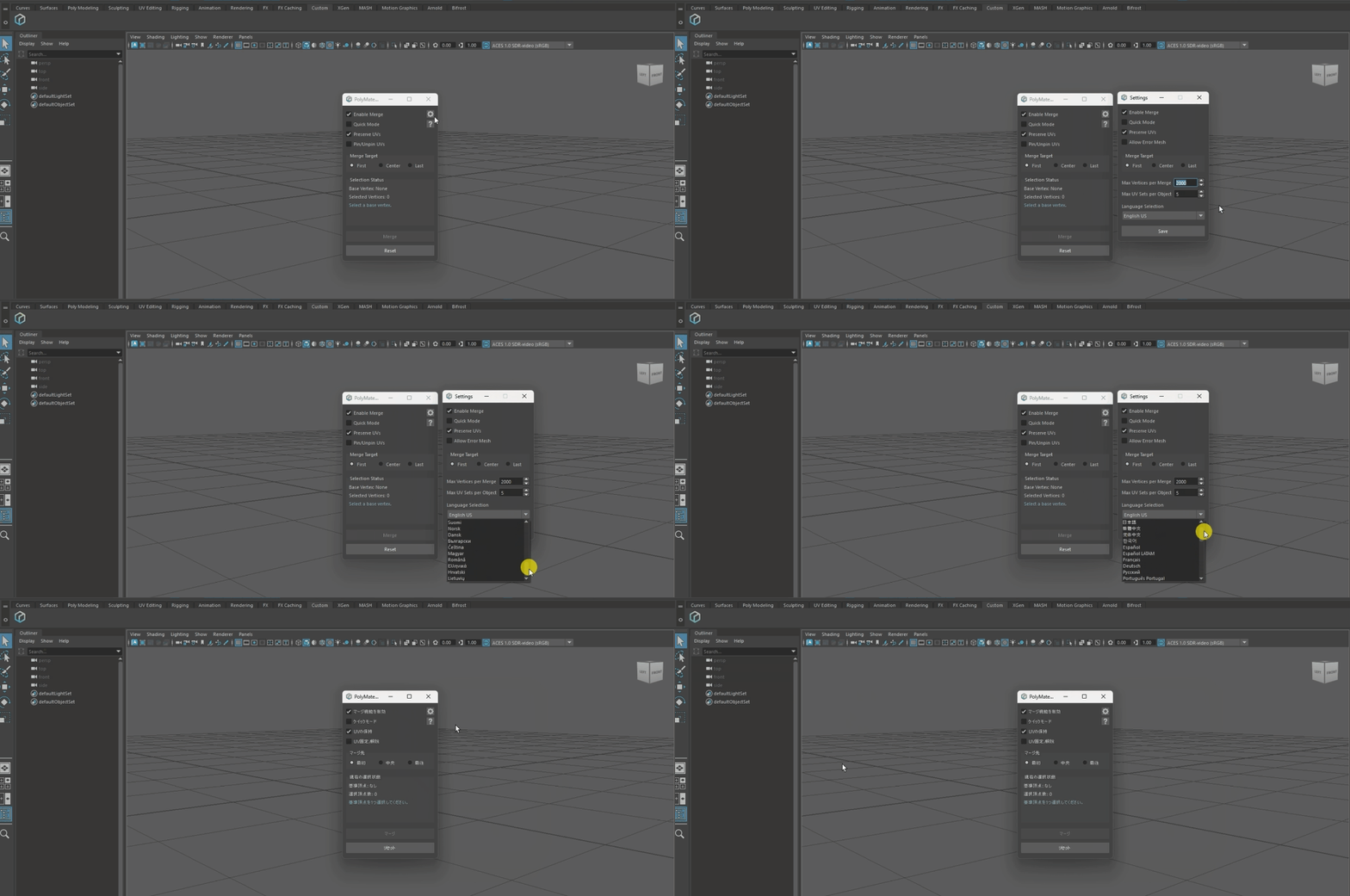
After the first launch, reviewing and updating the language settings is recommended.
▼Step 1: Open the settings dialog #
Click [Settings] (gear icon) at the top-right of the screen to open the settings dialog.
▼Step 2: Select a language and save #
From the language dropdown at the bottom of the dialog, choose your language and click [Save].
You can switch languages at any time from [Settings]. Changes take effect immediately.
◎Notes #
PolyMate supports the following languages.
- English
United States (en-US)
United Kingdom (en-GB)
- Japanese
Japan (ja)
- Chinese (Traditional)
Taiwan (zh-TW)
- Chinese (Simplified)
China (zh-CN)
- Korean
Republic of Korea (ko)
- Spanish
Spain (es-ES)
Latin America: Mexico, Argentina, Colombia (es-LA)
- French
France (fr)
- German
Germany (de)
- Russian
Russia (ru)
- Portuguese
Portugal (pt-PT)
Brazil (pt-BR)
- Polish
Poland (pl)
- Thai
Thailand (th)
- Vietnamese
Vietnam (vi)
- Indonesian
Indonesia (id)
- Malay
Malaysia (ms)
- Filipino
Philippines (tl)
- Hindi
India (hi)
- Turkish
Türkiye (tr)
- Italian
Italy (it)
- Dutch
Netherlands (nl)
- Ukrainian
Ukraine (uk)
- Swedish
Sweden (sv)
- Finnish
Finland (fi)
- Norwegian
Norway (no)
- Danish
Denmark (da)
- Bulgarian
Bulgaria (bg)
- Czech
Czechia (cs)
- Hungarian
Hungary (hu)
- Romanian
Romania (ro)
- Greek
Greece (el)
- Croatian
Croatia (hr)
- Lithuanian
Lithuania (lt)