

◎Overview #
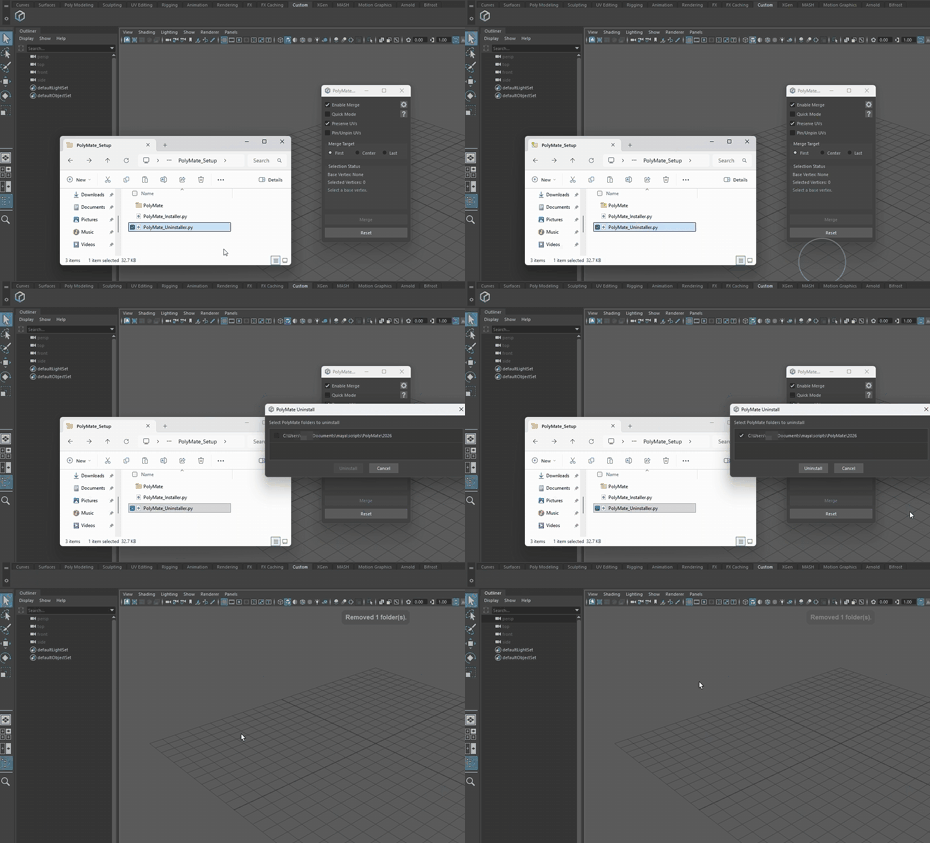
Uninstall by drag and drop as well.
▼Step 1: Drop the uninstaller #
From the PolyMate_〇〇(Tool Name)_Setup folder,
drag and drop PolyMate_Uninstaller.py into Maya’s viewport.
▼Step 2: Execute #
The installed directory will be shown.
Select it and proceed to uninstall.
◎Manual Uninstallation #
For manual uninstallation, refer to the following.
- Exit Maya.
- Delete the
PolyMatefolder located directly under one of the “scripts” paths below.
▼Shared location (all versions) #
C:\Users\<UserName>\Documents\maya\scripts\PolyMate▼Per-version locations #
Example:
C:\Users\<UserName>\Documents\maya\2026\prefs\scripts\PolyMate
C:\Users\<UserName>\Documents\maya\2026\custom\tools\scripts\PolyMate- Remove the Shelf button.
After starting Maya, delete the PolyMate button. - Restart and verify. In Script Editor (Python), run the command below; if it raises ModuleNotFoundError, uninstallation is complete.
Python
import PolyMate